
Particle Authoring Tools
Engine-owned workflow for Particle Preview, the built-in SPARK source editor, external Effekseer authoring, and focused viewers. Project particle catalogs, art direction, budgets, asset licenses, and acceptance scenes belong in the embedding game.
Use Particle Format for the exact .spark, .spk,
.efkproj, .efk, baker, bounds, cache, and runtime contract. Use this page
to operate the authoring tools. Use Viewer Tools for the
standalone Particle Viewer.
Complete authoring route
- In Mapper, keep the Map browser, Controls, Workspace, Inspector, and History surfaces visible while selecting and placing content.
- For SPARK source, open the built-in editor, use Adding mode or Removing mode, and finish explicitly with Save or Discard. Effekseer source remains in the pinned external editor.
- Re-bake, then pin the backend, resource, seed, prewarm, direction, and replay state before comparing the focused preview and runtime routes.
- For review evidence, capture the visible Mapper application window with a
platform screenshot tool. Keep that UI proof separate from the map-only TGA
produced by
Game.SaveMapperScreenshot.
Choose the backend before authoring
Enable only the backend the project intends to ship:
SetOption(FO_SPARK_PARTICLES ON)
SetOption(FO_EFFEKSEER_PARTICLES OFF)
| Backend | Editable source | Baked runtime | Authoring UI |
|---|---|---|---|
| SPARK | .spark XML |
.spk |
Mapper -> Windows -> SPARK particle editor |
| Effekseer | .efkproj |
.efk |
Pinned external Effekseer editor |
Particle Preview and Particle Viewer are backend-neutral: they list baked
runtime resources from every enabled backend. The SPARK editor is
source-specific. It edits .spark; never hand-edit .spk or .efk.
After changing a source, bake before runtime or Mapper preview validation:
cmake --build Build/<preset> --config RelWithDebInfo --target BakeResources
Use ForceBakeResources when dependency invalidation is under investigation,
not as the normal substitute for a correct resource graph.
Particle Preview in Mapper
Open Windows -> Particle preview. The window appears only when at least one particle factory extension is active.
The preview:
- searches baked
.spkand.efkresources; - can refresh the list after a bake;
- places the selected effect at the mouse hex or current view center;
- accepts scale from
0.01through100; - applies X/Y offsets;
- accepts a deterministic integer seed when the backend supports it;
- optionally prewarms the system;
- exposes Play, Restart, and Remove;
- displays the active map hex.
Scale, offset, seed, and prewarm changes take effect on Play or Restart, not by mutating an already-running instance in place. Use Remove before comparing unrelated effects so old systems do not overlap.
Middle-click rotates the preview direction in the map context. Controls also shows the current preview direction. Map placement is useful for occlusion, depth, lighting, and scale checks that an isolated viewer cannot provide.
Reproducible startup preview
The Mapper settings can open one baked effect automatically:
Mapper.StartMap = TutorialMap
Mapper.ParticlePreviewEffect = Documentation.spk
Mapper.ParticlePreviewScale = 1.0
Mapper.ParticlePreviewSeed = 20260731
Mapper.ParticlePreviewPrewarm = True
Use a fixed seed and capture viewport for documentation and visual regression evidence. A deterministic seed does not make frame timing deterministic across all renderers; record backend, warmup, resolution, and Engine revision too.
SPARK source browser
Build with FO_SPARK_PARTICLES, then open
Windows -> SPARK particle editor. The source browser scans raw resource
inputs for .spark, not baking output. It shows the source count and number of
open editors, supports case-insensitive filtering, and refreshes after source
tree changes.
Select a source to open one editor per asset path. Selecting an already-open source brings its editor to the front instead of creating a second mutable copy.
For deterministic automation or documentation capture, set the authored source explicitly:
Mapper.SparkEditorSource = Documentation.spark
Mapper validates the value against raw .spark inputs and fails startup with
a source-specific error when the asset is absent. The setting opens the editor
directly without also leaving the source browser visible.
If a .spk appears but its .spark source does not, the project has lost the
editable authority or configured the wrong input roots. Restore the source;
do not reverse-engineer the baked blob as the normal workflow.
SPARK editor
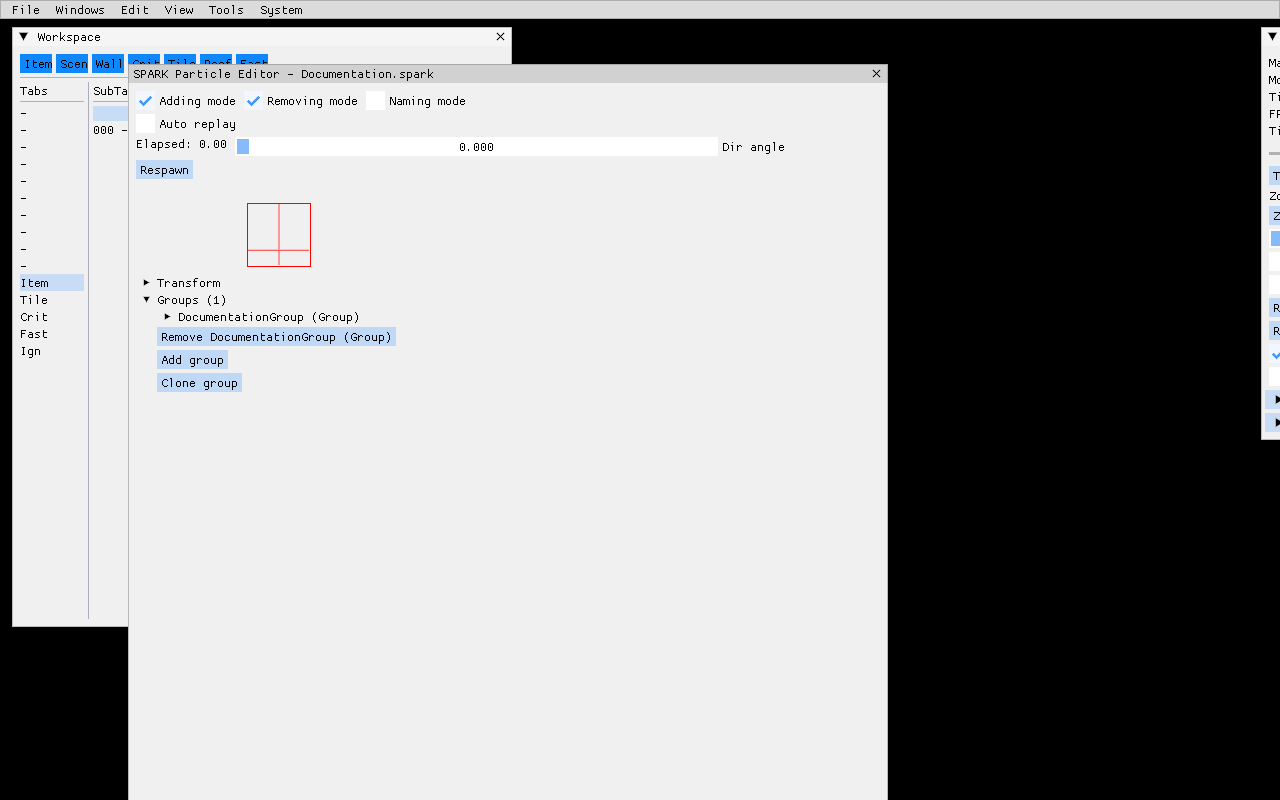
The header controls:
| Control | Purpose |
|---|---|
| Adding mode | Shows controls for adding supported child objects and collection entries. |
| Removing mode | Shows remove controls beside editable objects and entries. |
| Naming mode | Exposes object-name editing where SPARK supports names. |
| Auto replay | Respawns the preview after the effect completes. |
| Elapsed | Shows preview time. |
| Dir angle | Rotates preview direction. |
| Respawn | Recreates the preview immediately. |
The editor keeps a source backup when opened. Save serializes the current
SPARK system back to the raw .spark, reindexes resources, and invalidates the
corresponding .spk so the next bake cannot silently reuse stale runtime
data. Discard restores the open backup. Closing a changed editor asks
whether to save, discard, or cancel.
Object hierarchy
The root is a SPARK System containing Groups. A Group owns particle capacity,
lifetime, initializers/interpolators, emitters, modifiers, actions, and one
renderer. Transformable objects expose position/orientation fields where the
SPARK type supports them.
The built-in editor covers:
- System and Group;
- default, random, simple, and graph float/color initializers and interpolators;
- Point, Sphere, Plane, Ring, Box, and Cylinder zones;
- Static, Random, Straight, Spheric, and Normal emitters;
- Gravity, Friction, Obstacle, Rotator, Collider, Destroyer, Vortex, EmitterAttacher, PointMass, RandomForce, and LinearForce modifiers;
- ActionSet and SpawnParticlesAction;
SparkQuadRenderer.
Adding mode creates a valid default object and inserts it into the selected owner. Removing mode can sever references; review emitter/action/group relationships before save. Naming mode helps large systems, but names are not a replacement for a project particle catalog and stable source path.
Texture and effect selection
SparkQuadRenderer stores the effect and texture resource names consumed by
the baked/runtime system.
The editor’s texture picker enumerates .tga files beside the .spark source.
An existing valid PNG reference can still load and preview after baking, but it
is not offered by that picker. Prefer a project convention that matches the
tool, or edit/review the source deliberately when retaining PNG.
Texture preview uses the canonical baked sprite parser. It requires exactly one direction and one frame, then reconstructs the logical image when sprite mesh cropping is enabled. A raw PNG/TGA byte stream is not a baked sprite resource and must not be fed to that loader.
Effects must be baked .fofx resources compatible with particle rendering.
Validate alpha/depth/blend state in Effect Format, then
inspect the result on every supported renderer.
Minimal SPARK source
The smallest useful loop has a System, one Group, an emitter, and a
SparkQuadRenderer:
<SPARK>
  <System name="DocumentationParticle">
    <attrib id="groups">
      <Group name="DocumentationGroup">
        <attrib id="capacity" value="8" />
        <attrib id="life time" value="1;1" />
        <attrib id="emitters">
          <StaticEmitter>
            <attrib id="tank" value="-1" />
            <attrib id="flow" value="4" />
            <attrib id="force" value="0" />
            <attrib id="zone">
              <Point>
                <attrib id="position" value="(0,0,0)" />
              </Point>
            </attrib>
            <attrib id="full" value="false" />
          </StaticEmitter>
        </attrib>
        <attrib id="renderer">
          <SparkQuadRenderer>
            <attrib id="draw in scene" value="true" />
            <attrib id="active" value="true" />
            <attrib id="effect" value="Effects/Particles_ColorAdd.fofx" />
            <attrib id="texture" value="ItemStub.png" />
            <attrib id="scale" value="0.5;0.5" />
            <attrib id="atlas dimensions" value="1;1" />
          </SparkQuadRenderer>
        </attrib>
      </Group>
    </attrib>
  </System>
</SPARK>
This is the checked-in
Examples/MinimalMultiplayer/Particles/Documentation.spark fixture. The
negative tank means unlimited emission; positive flow controls emissions per
second. Production effects should choose capacity, lifetime, flow, bounds, and
renderer state from measured visual/performance requirements rather than copy
these tutorial values.
Effekseer authoring
FOnline does not embed the Effekseer editor. Use the Engine-pinned Effekseer
1.80.5 toolchain:
- Open or create
.efkprojin the pinned external editor. - Keep referenced textures/models/materials in project-owned resource inputs.
- Save the editable
.efkproj. - Run
BakeResources;EffekseerCompileremits.efkplus mandatory Engine bounds metadata. - Open the baked
.efkin Mapper Particle Preview. - Open it in Particle Viewer for isolated playback, camera, background, wireframe, and viewport checks.
- Validate it in a representative runtime map and on every supported backend.
Do not substitute a newer editor/compiler merely because it opens the file. Project files and compiled payloads are version-sensitive. Upgrade the pinned toolchain as a reviewed Engine dependency change with fixture rebakes and visual comparison.
The Mapper has no Effekseer source editor. A missing .efkproj cannot be fixed
inside Mapper; restore the project source.
Particle Viewer
Particle Viewer can run standalone or inside Mapper. It provides a focused resource list, playback/restart, deterministic seed, prewarm, scale, offset, direction, viewport/background controls, and wireframe inspection without map content.
Use it for:
- effect-local framing and measured bounds;
- repeatable backend comparisons;
- spotting clipping, unexpected billboard size, and depth artifacts;
- separating particle failures from map/prototype/lighting failures.
Use Mapper preview afterward because isolated success does not prove map placement, occlusion, or world scale. Full controls and target names are in Viewer Tools.
Validation workflow
For each changed effect:
- Validate the source XML/project in its owning editor.
- Run
ForceBakeResourcesonce when proving a clean source-to-runtime path. - Confirm the expected
.spkor.efkappears and no authored runtime blob exists in source. - Preview with a fixed seed and documented prewarm.
- Restart several times; inspect one-shot and loop completion.
- Test minimum and maximum project scale/offset/direction.
- Inspect Particle Viewer bounds and wireframe.
- Place it on a representative indoor and outdoor map where applicable.
- Test every supported renderer/platform.
- Review logs for missing effect/texture, parser, bounds, cache, and native backend failures.
- Record screenshot/video evidence with revision and asset provenance for a user-visible release change.
BakeResources proves conversion. It does not prove artistic timing, visual
readability, overdraw, platform performance, correct ownership, or cleanup.
Common failures
| Symptom | Likely cause and next check |
|---|---|
| Particle Preview is absent | No particle backend was enabled at configure time. |
| Source exists but runtime resource is absent | Wrong resource pack, disabled backend, failed bake, or source extension mismatch. |
.spk/.efk exists in source control |
Generated runtime output was authored or copied back; remove it and restore editable source. |
| SPARK browser has no entry | .spark is outside raw resource input roots or filter text excludes it. |
| SPARK editor opens but preview fails | Missing baked .spk, effect, or texture; invalid source; wrong baked sprite cardinality; inspect the log. |
| Effect disappears before capture | One-shot tank/lifetime completed; use Auto replay, Respawn, or a deliberate loop fixture. |
| Scale/seed changes seem ignored | Use Play or Restart after changing controls. |
| Effekseer source cannot open in Mapper | Expected: Mapper previews .efk; edit .efkproj in the pinned external editor. |
| Effect clips in Viewer or model attachment | Rebake measured bounds and inspect source scale, billboard radius, model link, and old cached runtime output. |
| Different result on another renderer | Compare effect state, texture filtering/orientation, depth, timing, and backend support using the same seed and viewport. |
Production practices
- Keep source and runtime extensions visually distinct in docs, scripts, and resource packs.
- Give effects stable descriptive paths; do not encode temporary task IDs.
- Keep texture/effect dependencies close enough for ownership and license review.
- Prefer bounded capacities and measured loops over unconstrained visual load.
- Use fixed seeds only for repeatable evidence; preserve intended runtime randomness where the game needs it.
- Test cleanup when maps unload, entities disappear, viewers restart, and editor windows close.
- Keep a small permissively licensed example effect independent of any game project. The minimal multiplayer fixture serves that role.
- Reconcile the Particle Format guide, this manual, focused tests, examples, and screenshots whenever particle/editor source changes or an Engine pin moves.
Ownership boundary
The Engine owns backend integration, source/runtime formats, the baker, Particle Preview, SPARK editor, focused Viewer, script/runtime facade, and reusable diagnostics.
The embedding game owns:
- which backend is enabled and supported;
- concrete effects and dependencies;
- style, readability, accessibility, and content ratings;
- GPU/CPU/overdraw budgets;
- asset licenses and provenance;
- map/model attachment policy;
- platform acceptance scenes and release evidence.
Examples and screenshots demonstrate the tool contract. They do not define a production game’s visual policy.